


Role
UX/UI Designer
Purpose
College students rely heavily on live streaming for community and entertainment, but YouTube Live lacks the tailored, interactive, environment they expect. This concept redesign focuses on creating a personalized Youtube Live experience and online community for college students while adhering to Youtube’s current design system.
Skills
User Experience (UX) Research
UI Design
Prototyping


What's Wrong with Youtube Live?
1. Subscribed live channels not prioritized: pushed down to 3rd row in sidebar and home page
2. Livestream viewer count buried in 3rd position
3. No content-type + personalized filtering

The Problem...
How can we design YouTube Live to prioritize a sense of community and personalized experience for the young adult audience?
Understanding Live Streaming and the User
To understand the live streaming landscape, I analyzed mainstream platforms including Twitch, Hulu, and YouTube Live to identify what community and discovery features resonate most with young adult audiences. I then conducted interviews with 13 college students to validate those observations and surface what they actually prioritize when choosing where--and what-- to watch live. The goal was to challenge my assumptions about YouTube Live's gaps and ground the redesign in real user behavior rather than surface-level UI comparisons.
What Are the Home Page Necessities?
During the Low-Fi to Mid-Fi stage, I interviewed 13 college students to understand what features/categories are most important to display on the home pages of live-streaming platforms.
61.5%
rely on Twitch as their go-to live-streaming platform
69.2%
claims that home page should reflect past viewing behaviors


69.2%
go onto live-streaming platforms with a creator to watch in mind
76.9%
depend on finding new creators based on recommended streams & creators
What are the Mainstream Live Streaming Platforms?


Emergence of 2 Main User Personas
When synthesizing the data from the survey responses of undergraduate students, two main users came into play--active viewers who prioritized watching live streams of video games and casual viewers who browsed available stream options.

Home Page Low-Fis
Brainstorming how to reorganize categories and highlighting subscribed streamers to be more visible in the UI.

Redesigned Assets!
Yes, Youtube Live successfully organizes each video with a custom thumbnail, title, channel name, view count, an a LIVE overlay--if applicable. However, after conducting user interviews, I wanted to accentuate the LIVE overlay by pairing it with the viewer count, as the original design hides this number to the third important text to read, and add content-type categories through tags to allow users to quickly find relevant live content.
Live Stream Card
Original

✅ LIVE overlay
❌ Content-type tags
❌ Viewer count overlay
Redesigned

✅ LIVE overlay
✅ Content-type tags
✅ Viewer count overlay
Featured Stream Card
Original

✅ LIVE overlay
❌ Content-type tags
Redesigned

✅ LIVE overlay
✅ Content-type tags
✅ Consistent text format as Live Stream Cards
Live Channel Displays
Sidebar
Original

✅ LIVE overlay
❌ Content-type tags
❌ Viewer count
Redesigned

✅ LIVE channel shown with viewer count
✅ Content-type tags
Introducing Community & Personalization!
Adding a section where users can view trending channels monthly and their top stream categories introduces both what the Youtube Live Community and each user enjoys watching--bringing in community and personalization.
Top Channel Cards
Fostering a sense of content creation community by featuring top channels/streamers monthly.

Category Cards
Visualizing how users can see and find new content based on past viewing behaviors.

Hi-fi Design
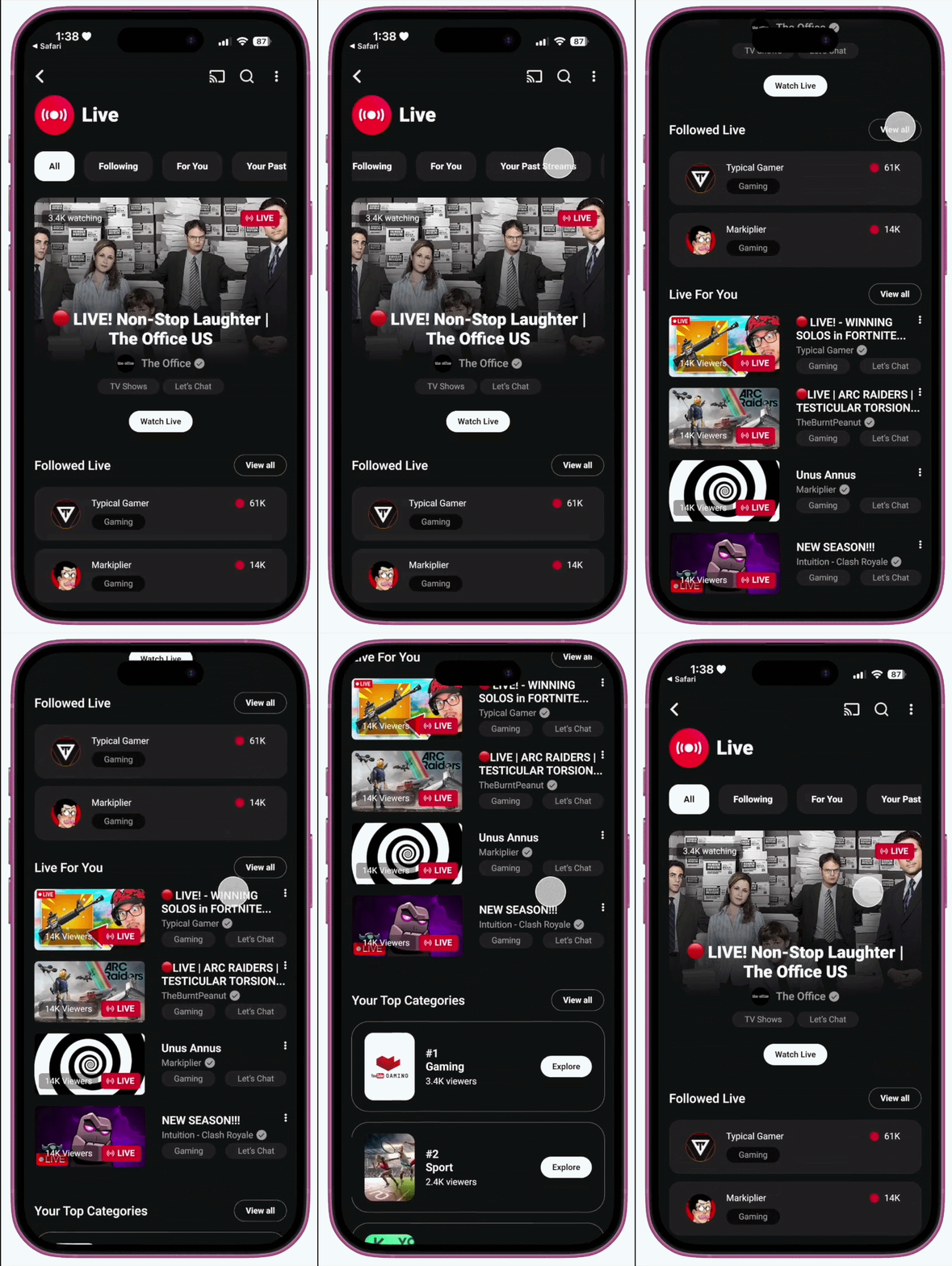
Final design with the addition of the content-type category bar and tags, redesigned and new assets, and new format grouping of live-streams.
Mobile


Desktop

From Concept to Production
What I'd do next to move this from a portfolio concept to a shippable project.
1. Validate the solution with usability testing
I've tested the problem through user interviews, but never tested the fix. Running a small round of task-based testing on the redesigned assets would help bring the "I diagnosed and designed" to a "I diagnosed, designed, and proved it works" solution.
2. Define success metrics testing
I'd want this redesign to be measured against something concrete--time-to-first-click on a stream, engagement rate with subscribed channels, click-through on content-type tags. Tracking metrics would help me understand the business impact of the redesign, not just its visual improvements.
3. Address technical feasibility and tradeoffs
This redesign relies on the feasibility of backend work--live viewer counts, a tagging and categorization system, monthly-rotating top-channel rankings. I'd want to think through how to phase this (MVP vs. later iterations) and flag key considerations to engineering early, since shipping a design is a different challenge than designing it.


